 Wayther
How to Read Weather Radar Before a Drive
Learn how to read weather radar maps, interpret precipitation colors, track moving rain and storms, and understand what radar can and cannot tell you before a drive.
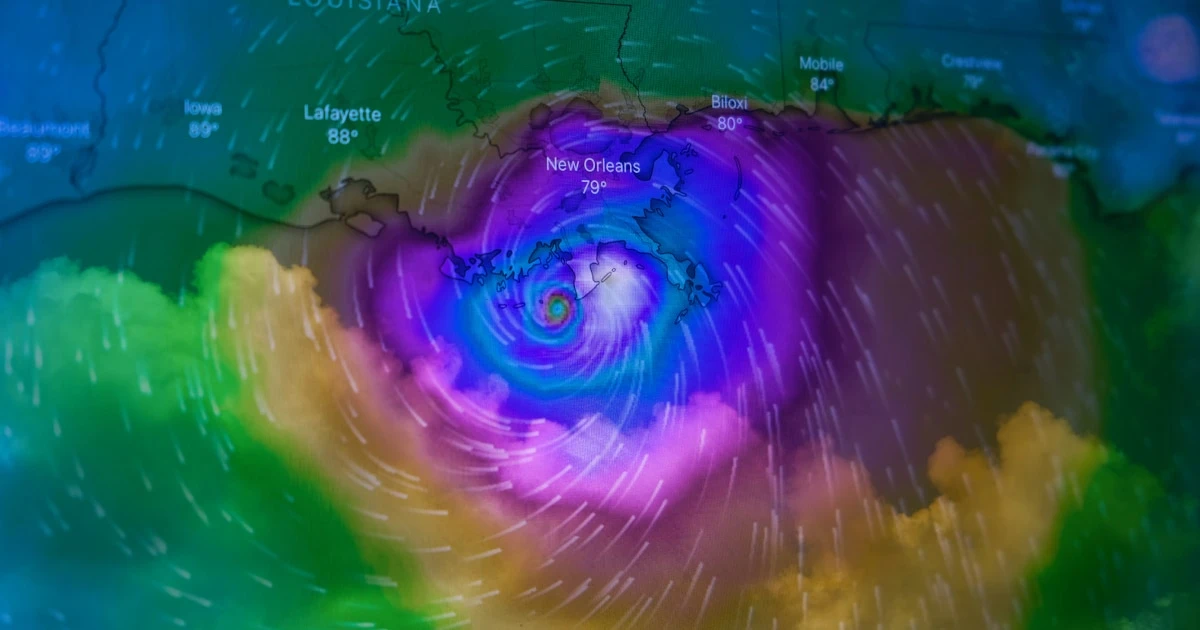
A weather radar map can help you understand where rain or snow is falling and how precipitation has moved over the last few scans. Before a road trip, it can offer a useful picture of current conditions and help you assess whether a band of rain or a storm is approaching your area.
But radar is not the same as a forecast. It mainly shows observations of precipitation, while a journey planned for later in the day depends on how the weather is expected to develop.
To use radar effectively, you need to understand the colors, look at movement over time, and know what the map cannot tell you.
1. Understand what weather radar shows
Weather radar works by transmitting pulses of electromagnetic energy into the atmosphere and measuring the signals that return when they encounter targets such as raindrops, snowflakes, or hailstones.
The processed data can help meteorologists estimate the location, distribution, and intensity of precipitation.
A typical radar map can help you answer questions such as:
- Where is precipitation currently being detected?
- Which areas appear to have heavier precipitation?
- Is a band of rain moving towards or away from my area?
- Are precipitation areas becoming larger, smaller, or more intense?
- Is a storm system close to the road I plan to take?
The exact information depends on the radar product and the service displaying it. Some maps show precipitation reflectivity, while others provide estimated rainfall rates, accumulated precipitation, or additional derived information.
Before interpreting the map, check its timestamp, legend, and product description. These details tell you what you are looking at and how current the information is.
2. Learn how to interpret radar colors
Many precipitation radar maps use colors to represent the strength of the radar return. A common display uses cooler colors for weaker echoes and warmer or brighter colors for stronger ones.
| Color | Precipitation Intensity |
|---|---|
| Blue | Weak radar echoes or light precipitation. |
| Green | Light to moderate precipitation. |
| Yellow | Moderate to stronger precipitation. |
| Orange | Heavier precipitation. |
| Red | Very strong echoes, intense rainfall or thunderstorms. |
These are general examples, not a universal color scale. Some services use different colors, thresholds, and products. Always check the legend on the radar map you are viewing.
A stronger radar echo does not automatically tell you the exact amount of rain reaching the road. Radar estimates depend on the type and size of precipitation particles, the radar’s position, and other atmospheric factors.
For driving, look at the overall pattern as well as individual colors. A broad area of moderate rain that lasts for hours may affect your journey differently from a brief, intense shower.
3. Watch the animation, not just a single image
A single radar image shows a snapshot. An animation of successive images reveals how precipitation has moved and changed over time.
When reviewing a radar animation, look for three things.
Direction of movement
Observe how the precipitation areas shift between scans. This gives you an idea of their recent direction of travel.
Do not assume that the rain will continue along the same path or at the same speed. Weather systems can change direction, develop new cells, or weaken.
Speed of movement
If a band of rain moves across the map quickly, it may pass through an area relatively soon. If it moves slowly, precipitation may persist over the same location for longer.
Treat this as a short-term indication rather than a precise arrival-time prediction. Your location, the band’s shape, and changes in the weather system all affect what happens next.
Changes in intensity and structure
Look for areas that become more extensive or develop stronger echoes. A line of intense cells may indicate a different situation from scattered, isolated showers.
For a road trip, the useful question is not simply whether rain is present now. It is whether recent observations suggest that precipitation could affect a particular section of your route around the time you expect to reach it.
4. Estimate whether rain could affect your route
Imagine you are planning a three-hour drive. The radar shows a band of rain crossing the region between your starting point and destination.
You can use the animation to investigate:
- Where the rain is currently located.
- Which direction it has been moving.
- Whether it appears to be strengthening, weakening, or changing shape.
- Whether it may intersect your route during the next part of the journey.
This is useful for understanding the immediate weather situation, especially when showers or storms are developing.
However, avoid treating the radar like a precise countdown. A band of rain does not necessarily move as a solid shape, and new precipitation may form ahead of it. Rain can also weaken before reaching your location.
For a journey several hours away, or a trip planned for tomorrow, use a weather forecast rather than extrapolating the radar animation far into the future.
5. Know the limitations of weather radar
Radar is a valuable observation tool, but it does not provide a perfect picture of everything happening at ground level.
Radar does not always show every shower
Light precipitation can sometimes be missed, particularly when it falls from low clouds or is too weak to produce a clear return. The radar beam may also pass above precipitation near the ground, especially at greater distances from the radar.
This means that rain can occur even when little or no precipitation appears on the map.
Not every echo means rain is reaching the road
Radar signals can be affected by terrain, buildings, atmospheric conditions, and other objects. Some echoes do not represent precipitation reaching the ground.
The farther the precipitation is from a radar site, the more the height of the radar beam can matter when interpreting what is happening near the surface.
Colors do not directly measure road conditions
A radar map cannot tell you whether a road is flooded, whether water is accumulating in a particular lane, or whether a surface has become slippery.
Even when the radar shows intense rainfall, the consequences depend on local drainage, terrain, soil conditions, and other factors.
Radar is not a long-range forecast
Radar is primarily an observation of recent or current precipitation. It can support short-term estimates, but it becomes less reliable as a way to predict the exact location and timing of rain further into the future.
For a long drive, combine radar observations with forecasts and official weather warnings.
6. Remember that rain is not the only driving hazard
A precipitation radar can be useful when checking for rain, snow, or some types of storms, depending on the system. But it should not be treated as a complete driving-weather map.
Other hazards require additional information.
- Fog: Visibility forecasts and local observations are more relevant than a standard precipitation radar.
- Strong winds: Check wind speeds and gust forecasts, especially on exposed roads and for vehicles towing trailers.
- Ice: Radar cannot confirm whether the road surface is frozen or slippery. Check temperatures, local warnings, and road reports.
- Flooding: Radar can reveal heavy precipitation, but it cannot confirm whether a specific road is flooded or passable.
- Lightning: Lightning information generally comes from dedicated detection systems rather than a standard precipitation radar display.
If severe weather is forecast, consult official warnings and local authorities. Do not rely on radar alone to decide whether a journey is safe.
For more specific guidance, see our articles on driving in thunderstorms, driving in rain, and driving in fog.
7. Use radar for the immediate situation and forecasts for trip planning
Radar and weather forecasts serve complementary purposes.
| Tool | Most useful for |
|---|---|
| Precipitation radar | Seeing where precipitation has recently been detected and how it has moved |
| Weather forecast | Estimating conditions expected later along your route |
| Official weather warnings | Understanding significant or potentially dangerous weather |
| Road-condition reports | Checking closures, restrictions, and reported road hazards |
If you are leaving soon and a band of rain is approaching, radar may help you understand the immediate situation.
If you are planning a drive for later today, tomorrow, or several days from now, you need forecasts for the locations and times that matter to your journey. You can then use updated radar observations closer to departure when available.
Neither forecasts nor radar guarantee the exact conditions you will encounter. Check again if the weather is changing, and adjust your plans when official advice or road conditions warrant it.
8. Plan weather around your route with Wayther
A radar map is useful for understanding recent precipitation, but a road trip also requires you to consider conditions at different locations and times in the future.
Wayther helps you explore forecast weather along your driving route, compare departure times, and evaluate alternative routes before leaving. You can review variables such as precipitation, temperature, wind, and visibility where forecast data is available.
For example, if rain is forecast during the middle of your journey, you can examine the expected conditions along that section and compare whether a different departure time or available route may be worth considering.
Wayther is a route-weather planning tool, not a live radar service. Use a dedicated radar map when you need recent precipitation observations, and combine it with forecasts and official warnings for a more complete picture.
The aim is to understand the weather you may encounter, not to assume that any app can guarantee a dry or safe journey.
Frequently asked questions
- What do the colors on a weather radar map mean?
- Colors usually represent the strength of radar echoes associated with precipitation. In many common displays, green and blue indicate lighter precipitation while yellow, orange, and red indicate stronger echoes, but the exact meaning depends on the map's legend and radar product.
- How can I tell which direction rain is moving?
- View an animation of recent radar images and observe how the precipitation areas shift between scans. This shows recent movement, not a guarantee of where the rain will go next.
- How far ahead can weather radar predict rain?
- Radar primarily shows recent or current precipitation observations. Animating recent scans can help estimate short-term movement, but uncertainty increases as conditions evolve. For planning a drive hours or days ahead, use weather forecasts as well as radar when available.
- Can weather radar show whether it will rain on my entire driving route?
- Radar can show precipitation near multiple parts of a route at the time of observation. It cannot reliably describe the weather for the entire journey in the future, so check forecasts along the route and review updated conditions before departure.
- Can radar show lightning, fog, or icy roads?
- A standard precipitation radar does not directly show all these hazards. Lightning information usually comes from separate detection systems, fog needs other observations and forecasts, and radar cannot confirm whether a road surface is icy.
- Does Wayther include live weather radar?
- Wayther focuses on forecast weather along a driving route, including variables such as precipitation, temperature, wind, and visibility where available. It is not a live radar map, so use a dedicated radar service alongside Wayther when recent precipitation observations are important.
Before your next journey
Check the forecast for the road ahead.
Wayther is a road trip weather app for drivers, available on iPhone and iPad. It provides hour-by-hour road trip weather at every point on your route, timed to when you'll be there. Compare routes, find the best time to leave, plan 10 days ahead. Try it free.

Keep reading
How to Find the Best Time to Travel by Road
Find the best time to start a road trip by comparing weather along your route, expected arrival times and daylight before you leave.
Driving in Thunderstorms: What to Check Before You Leave
Learn how to plan a drive around thunderstorms, heavy rain, sudden gusts, hail and flash flooding, and when to delay your journey.

Driving in Fog: How to Read Visibility Along a Route
Learn how fog affects visibility, why conditions can change during a drive, and how to plan your departure around reduced visibility.